|
How to Accent Your Photo with Journaling |
|
Written by Gina Lideros - Contributing Editor
|
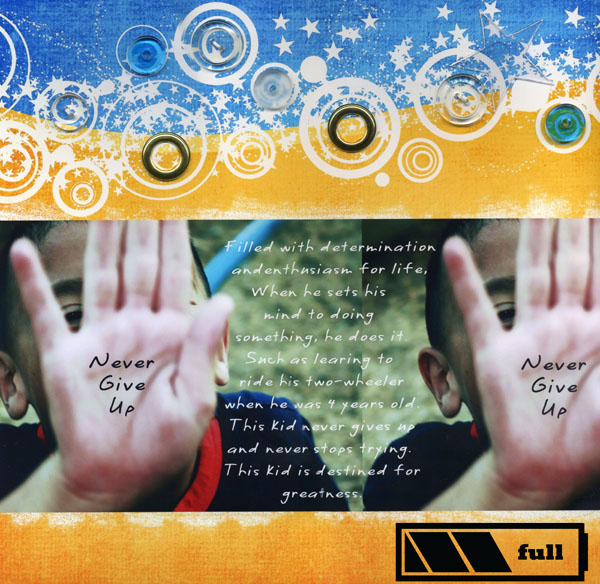
{JCSBOT SUBSCRIPTION=10,13,16,21,22,23}Layout Title: "Never Give Up"
This is a digital layout with traditional elements.
Digital Supplies:
- Adobe Photoshop Elements 5.0
- Tara Sroka Designs: Funky Summer kit paper, battery pack icon, @ at tarasrokadesigns.com
- Computer Font: CK quick
Traditional Supplies:
- Staples hi gloss photo paper
- Autumn Leaves: clear buttons
- Joann’s: gold rings
- Linked: glass disks
- Glue dots: adhesive
How to Accent Your Photo with Journaling
- Open your photo. Select the Horizontal Type tool from the toolbar. In the Options bar at the top of your screen, choose a desired font and font size. Then click on the color swatch to select your type color. I chose white for my journaling and black for my title. (In this example I placed my two photos on top of this fun digital paper. However, you can use this technique on your photo, print it out and then adhere to regular scrapbook paper, if you wish.)
- Click anywhere in your document and type the word or phrase.
- To type in another area go to Layer> New Layer, select your type color from the color swatch and then start typing.
- If you want to repeat your title or phrase such as I did in the example, you can do this by right clicking on your layer. Then select > duplicate layer from the drop down menu.
- Switch to the move tool and drag your type to your desired area.
- When finished go to Layer> Merge visible to merge your type layers onto your layout.
To finish, I printed the layout on high gloss photo paper. Then I had fun embellishing with items from my supply list as shown at the beginning of this project.
Give it a try! You'll see how fun and easy this is!
|
Gina Lideros - Contributing Editor |
| About the author: |
| My name is Gina Lideros and I live in Elk Grove, California with my husband Frank, and our two children, Kalee (8 years) and Matthew (5 years). I started traditional scrapbooking over 10 years ago, Digital scrapbooking (about a year ago) and recently discovered the best of both through Hybrid scrapbooking. |
| Read More >> |
» Comment here!
» Post Comment
Only registered users can write a comment.
Please login or register.
|