
How Do I Stretch the Use of My Digital Supplies?
November 29, 2009 by Bre Wiebe
Filed under Ask Bre, Vol 3 Issue 1
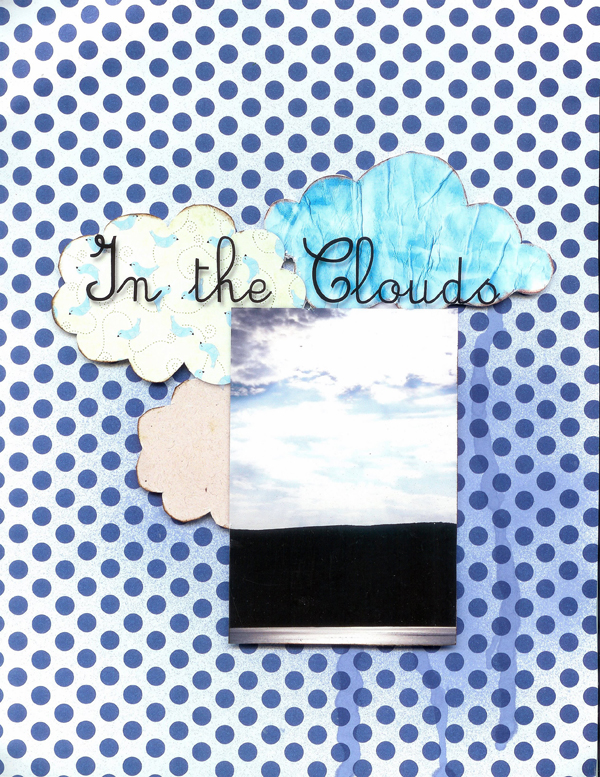
Sometimes I don’t like to use the same digi paper over and over again so here’s a way to recycle it. To stretch the use of your digital supplies make your paper into elements. For this project I made my paper into a cloud shape, but you could definitely use any shape! (There is also a printable PDF cloud link in this article)
- Open your paper in Photoshop (or your favorite graphics software program).
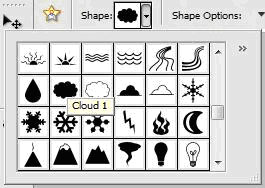
- Select the cookie cutter tool from the tools menu
- Click the cloud shape in the drop down menu.
- Hold down the shift key and cut a cloud out of the paper.
- Drag your cloud to your layout.
- Print out your layout, cut it out and pop dot it (dimensional adhesive dots) to some fun paper!
 |
| Click HERE to download the printable cloud element (or Right Click and Save As) |


 Easy Board Books




Facebook comments: