|
Author
|
|
DancingPrincess
Registered: October 2009
Posts: 64
|
|
Tue December 8, 2009 2:41pm
|
|
|
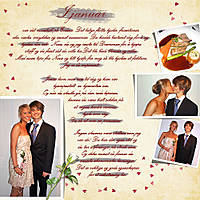
This is fabulous, Trine...I love the extraction and the stitched effect on the title is so COOL!
|
|
|
|
|
FS
Registered: November 2009
Posts: 18
|
|
Wed December 9, 2009 6:53am
|
|
|
Wow beautiful Trine!
I love it.
I have done a lot of photo clipping, but thats about it, not things what you, Jenn and Cindy can do, but I am learning!
If I may ask: How did you get the shade behind the main picture?, that makes the main picture so beautiful!
|
|
|
|
|
Vikingscrapper
Registered: November 2009
Posts: 22
|
|
Wed December 9, 2009 11:16am
|
|
|
Hi FS and thank you for your nice comment! :-)
I made the shadow like this:
1. Copy your pictures (Ctrl+J) and drag the copy layer below the picture layer
2. Ctrl-click on the thumbnail of the copy layer (this will be your shadow layer)
3. Make sure your foreground color is black and hit Alt+backspace to fill the copy-layer with black
4. Hit Ctrl+T to get the transform tool
5. While holding the Ctrl-key down drag one of the middle handles down to the right - if thats where you want your shadow to go (depends on where your light comes from)
6. Adjust the shadow layer while holding the Ctrl-key down and drag either the corner handles or the middle handles
7. Hit Ctrl+T to deselect the transform tool
8. Blur the shadow by selecting Filter, Blur, Gaussian Blur and set the radius to around 7 - 10 pixels or higher. Hit OK.
9. Finally - adjust the opacity to your liking.
I hope this is clear and that I didn't forget anything. Good luck.
Smile from Trine :-)
|
|
|
|
|
FS
Registered: November 2009
Posts: 18
|
|
Wed December 9, 2009 7:28pm
|
|
|
Yes, it is very clear, I visualized the steps you decribe and it makes totally sense.
I wish now that I could try it on a picture but this has to wait for a bit.
I am more and more convinced that I need to do a photoshop course, and would love it so much, I just need to have a little more patience with myself because of not having enough time lately to do this kind of fun stuff.
Thanks so much.
Frances
|
|
|
|
|
cindyjw
Registered: December 2009
Posts: 5
|
|
Wed December 9, 2009 8:26pm
|
|
|
Frances, we have a full total beginner photoshop elements course that is coming in January. I think it will help fill in the gaps for those of you who might still feel inadequate with Photoshop Elements.
Wow! This is a fabulous layout, Trine. Very inspiring. I love everything you have done here.
|
|
|
|
|
Vikingscrapper
Registered: November 2009
Posts: 22
|
|
Wed December 9, 2009 8:59pm
|
|
|
Another tip for you Frances!
In Photoshop CS you can make a shadow layer this way too:
Select the layer you want the dropshadow on and click the fx icon on the bottom of the layers panel. Select drop shadow and adjust the settings to your liking. Click OK.
In the layers panel you will have the drop shadow effect marked under the layer. Now, if you rightclick the name "drop shadow", you will get a drop list. On the drop list select Create layer and click OK. Photoshop will now put the shadow on its own layer below the picture layer. This is a cool trick I use quite often. Thought I should share it!
Smile from Trine :-)
|
|
|
|
|
Vikingscrapper
Registered: November 2009
Posts: 22
|
|
Wed December 9, 2009 9:05pm
|
|
|
Frances!
I just realized that I forgot a little something when I described how I made the shadow on my daughter. When you have adjusted the shadow layer to your liking and blurred it and lowered the opacity, use the eraser tool with a low opacity and a very soft brush (and quite large), to erase away the part of the shadow that is far away from the subject. That makes the shadow more realistic.
Trine :-)
|
|
|
|
|
FS
Registered: November 2009
Posts: 18
|
|
Thu December 10, 2009 8:03pm
|
|
|
ooh this is great Trine!
thanks for these extra tips,
I must say that I did not expect these kind of tips in this class,
I just barely dared to hope that someone will point to another tutorial ,
so, yeah, these great tips makes taking this class so much more fun,
it sure will help me get more out of Photoshop CS3!
Frances
|
|
|
|
|
cindyjw
Registered: December 2009
Posts: 5
|
|
Thu December 10, 2009 8:28pm
|
|
|
Thank you so much for sharing, Trine! Great tips!
|
|
|
|
|