Oops! Looks like you already tried to submit your email address, but have not yet verified it. Until your email is verified, you will not receive any emails from this list. All you need to do now is check your email for an email from Scrapbook Dimensions that says: Confirm your request for information. If you no longer have an email with verification instructions, you will be able to resubscribe after 6:26 AM EST on Friday, December 7 (11 hours and 51 minutes from now). If you continue to have difficulty subscribing after that time, please contact info@scrapbookdimensions.com for assistance. Be sure to check your spam box and whitelist our address if necessary. See below on instructions on how to whitelist an address for your email. Click here to go to the Scrapbook Dimensions website.
How Do I Whitelist My Address?We have established and maintain relationships with ISPs to ensure the best possible deliverability for our messages. Whitelisting is one of many steps that we take to get your messages to your subscribers. You don't need to whitelist your address or IP with ISPs - you're covered by our whitelisting. User-Level WhitelistingIndividual recipients, however, may have additional message filtering set up beyond what the ISP does. And you can and should take steps here to ensure that your subscribers are whitelisting your address in their email client. That way, you reduce the likelihood of your mail being filtered to their junk folder. To help guide you, here are examples of how individuals can whitelist your address in different email programs: Mozilla ThunderbirdBy default, Thunderbird will not mark your messages as junk if you are in your subscriber's Address book. Thunderbird users can check their settings at Tools > Junk Mail Controls: 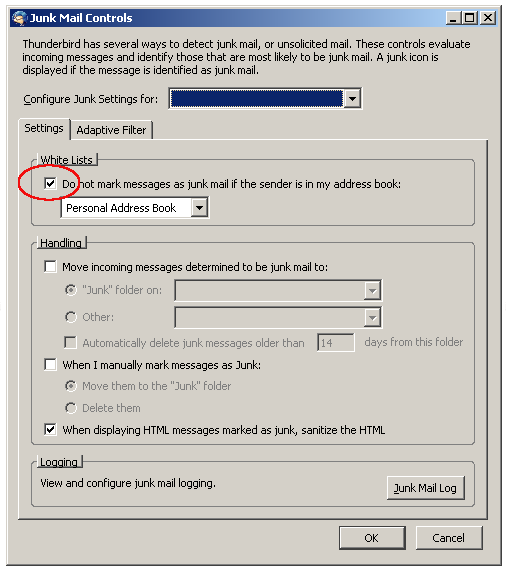 To add you to their address book, subscribers should create a New Address Book Card under File > New... 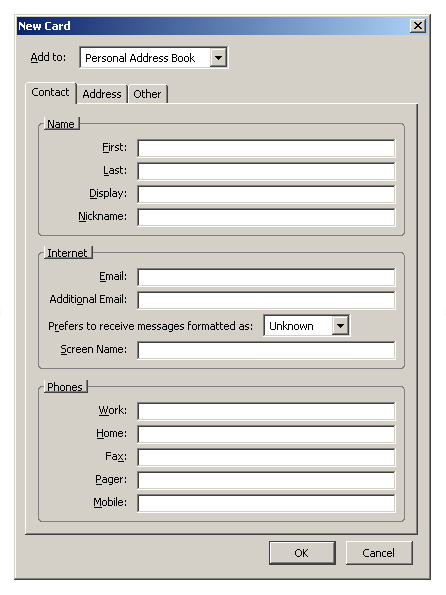 Yahoo Mail (Old Version)Yahoo users should create a filter to direct all messages from you to their inbox. To do this, they:
Yahoo Mail (New Version)Users of the new Yahoo Mail should also create a filter. Yahoo currently redirects you to the old Yahoo Mail interface to set up the filter, but in the future should integrate the Add Filter page directly into the new interface.  HotmailHotmail uses a "Safe List" that your subscribers should add you to:
Windows Live HotmailNot surprisingly, Windows Live Hotmail works similarly to the old Hotmail:
GMailGMail will automatically deliver mail from a user's Contacts list to the inbox. To add a contact:
AOL WebmailAOL has a "Custom Sender List" that users can specify. However, to use the Custom Sender List, users must choose to accept mail ONLY from their custom senders, or to reject mail ONLY from their custom senders. So, you need to make sure they are set to receive mail from All Senders:
|


